


Guitar Band: Rock Battle
4.510.93K Reviews
App Specs
- Version
- 4.17.0
- Updated On
- License
- Free
- Downloads
- 50,000,000+
- Developer
- Supercharge Mobile
- Categories
- Music
- Platform
- Android, iOS
Screenshots
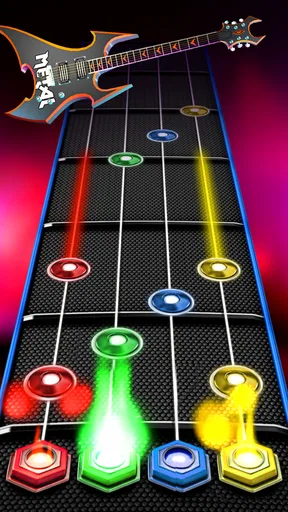
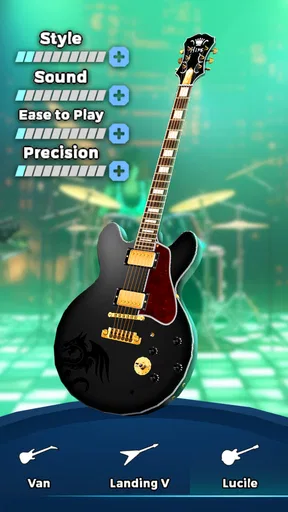
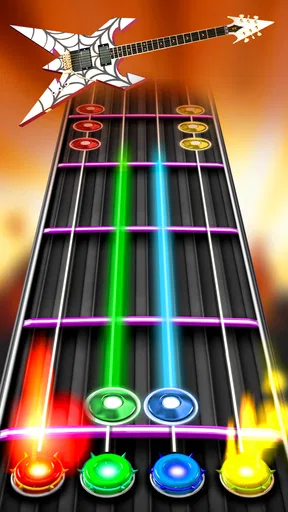

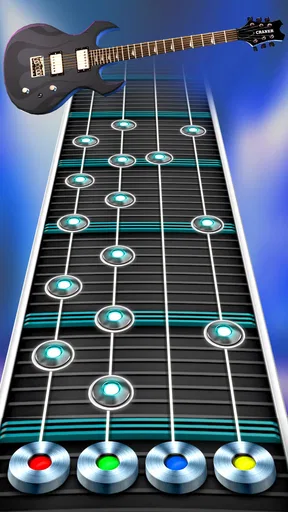
 Analysis by AppCompare
When I judge a music game on a phone, I care about more than whether its songs are catchy. I want to know how quickly I can get into a round, whether the controls remain manageable when a track gets busy, and what the experience is like when I only have a few minutes to spare. Guitar Band: Rock Battle is built around tapping along to a stream of notes, so its appeal is immediate: there is little to learn before you can start testing your timing.
Quick sessions, with a learning curve
The basic rhythm-game idea makes the first session easy to understand, but keeping a clean run is another matter. As the pace and note patterns become more demanding, I have to watch the screen closely rather than treat a song as background entertainment. That makes it a good fit for a short break when I want an active distraction, not for moments when I need to keep half my attention on a conversation or another task.
My practical tip is to begin by concentrating on accuracy instead of chasing a high score. Learning how the notes approach and finding a comfortable grip on the phone can matter more than tapping frantically. Once the visual rhythm feels familiar, faster sections become easier to read. Playing with the screen steady and your hands positioned consistently also helps avoid mistakes that come from awkward tapping rather than poor timing.
There is a trade-off here: a game that asks for focused timing can feel satisfying when I am in the mood to practise, but frustrating if I just want to hear a song without pressure. If you mainly want passive music listening, a streaming app is the more natural choice. If you want to interact with music and improve your timing from one attempt to the next, the rhythm format gives you a clearer reason to replay.
Busy play and sensible expectations
The heaviest moments are the sections where notes arrive quickly and the song demands several accurate responses in succession. These are the parts where I notice whether I am comfortable with the controls and whether I can stay focused. I would not assume that every missed note means the game itself is running badly: in a rhythm game, a small timing slip, a thumb covering part of the screen, or an uncomfortable hold can all feel like a performance problem.
If a round seems harder than expected, I find it useful to pause before changing anything else and check the simple causes first: is the screen clean, am I holding the phone securely, and am I tapping deliberately rather than rushing? For a more demanding song, give yourself a moment to settle into the beat before judging your result. This is a small but useful distinction: the game rewards attention, so a distracted attempt is not a fair test of either your skill or the app’s responsiveness.
On speed and stability, I prefer to keep expectations grounded. A rhythm game depends on the notes feeling in step with what is happening on screen, but performance can vary with a device’s condition and the demands of the session. I would avoid making a firm promise that it behaves identically on every phone. If you notice interruptions, closing other active apps and restarting the game are reasonable first steps before deciding that the experience is consistently unreliable.
Worth Reading Before You Choose

Flipboard Shows What News Apps Must Do Beyond the Feed

Switching to Android Auto Means Rethinking Your Driving Routine

Google Calendar Makes a Crowded Week Easier to Manage

Ludo King Makes the Most of the Minutes Between Plans

Baby Panda World Brings Quick Play to Modern Phones, but Its Game Library Feels Busy

ESPN’s Live Game View Makes Following Close Games Easier
Who will enjoy this kind of guitar game?
I would recommend it most to players who like music-based challenges, enjoy replaying a track to improve, and want a guitar-themed alternative to general tap-to-the-beat games. It can also suit someone curious about rhythm games who would rather learn through short attempts than spend time with a complicated simulation. The guitar framing gives the tapping a clear musical identity, even though this is a game rather than a lesson in how to play a real instrument.
On the other hand, I would steer away from it if you expect a realistic guitar simulator, hands-on instruction, or a music player that simply puts songs on while you do something else. It is also a poor match for anyone who dislikes repeating a challenge after a missed note or who finds quick visual sequences tiring. A slower, less competitive music game—or an actual guitar-learning app, if instruction is the goal—would be a better fit in those cases.
A realistic use case is a short wait between errands: I can open a song, focus on one run, and put the phone away when it is time to move on. For a longer session at home, I would take breaks rather than assume that more retries automatically mean better practice. The game’s progression can give each return a small target, but setting my own limit keeps a difficult section from turning a casual break into an irritating grind.
First Impressions
When I first fired up Guitar Band: Rock Battle, I was immediately drawn in by the slick, vibrant graphics. The developers really nailed the aesthetic, making you feel like you’re part of a high-energy gig from the get-go. The interface is intuitive, which is a big win because nobody wants to spend ages figuring out how to start playing, right?
Gameplay That Rocks
Diving into the gameplay, it’s all about hitting the right notes as they cascade down your screen. It’s reminiscent of those classic rhythm games we all loved, but with a fresh twist. You can choose from a wide range of songs, from classic rock anthems to modern hits. Whether you’re into shredding like Slash or prefer some laid-back strumming, there’s something for everyone.
One of the coolest features is the ability to form your own band. You can customize your band members, choose their instruments, and even decide your band’s style. It adds a layer of personalization that makes the game feel more immersive. Plus, who doesn’t love a bit of band drama now and then?
That band-building layer is part of what separates this from a bare-bones note-tapping game. I like having a visual identity to connect with the performances, but players should decide whether that kind of customization is a meaningful extra for them or simply a nice backdrop. If your main reason for playing is precision and score-chasing, the rhythm challenge will matter more than the presentation; if you enjoy shaping a band as you go, the added identity gives the game a more personal feel.
Challenge Yourself
The game isn’t just about playing songs; it’s about mastering them. As you progress, the difficulty ramps up, challenging you to hone your skills. You can compete in various battles and tournaments, which adds a competitive edge that keeps things exciting. I found myself constantly trying to improve my scores and climb the leaderboards.
Another thing I appreciated is the game’s progression system. You earn coins and rewards as you play, which you can use to unlock new songs and gear. It gives you a sense of achievement and keeps you motivated to play more. The in-app purchases are there, but you can totally enjoy the game without spending a dime, which is a refreshing change.
For anyone deciding whether to spend, I would treat optional purchases cautiously and first see how far the ordinary play loop takes you. The game is free to download, while optional items have a broad listed price range, from $0.99 to $299.99 per item. That range is worth noticing before making a purchase, particularly if you share a device or let a younger player use it. You do not need to buy something just because progression offers a reward to work toward; try the available play first and spend only if you are certain what you are choosing.
That approach also helps answer a common practical question: can I enjoy it without paying? The game’s progression gives you rewards through play, and the original experience remains playable without spending. I would still keep purchases intentional, because an optional purchase is not the same thing as a necessary upgrade. If you are evaluating it for a child, remember that the game is rated for Everyone, but it also includes in-app purchases, so the age rating does not remove the need to manage spending on a shared device.
Compared with music games that focus mainly on dancing, singing, or broad beat-matching, this one leans into the fantasy of performing as a guitar-led band and improving song runs. That makes it more appealing to someone who wants a rock-stage presentation than to someone seeking a broad music library or a realistic instrument interface. I would choose based on that distinction rather than assuming every music game offers the same kind of play.
Guitar Band: Rock Battle is made by Supercharge Mobile and has an average rating of 3.9 from around 284,000 ratings, with roughly 10,000 written reviews. It has passed 10 million installs, which suggests plenty of players have tried it, though popularity alone cannot tell you whether its timing style will suit you. The current version is 4.15.3, and it requires Android 7.0 or later. Those details matter most if you are checking compatibility on an older phone; even when a device meets the minimum, your own experience may depend on how well it handles games generally.
Final Thoughts
Overall, Guitar Band: Rock Battle hits all the right notes for a mobile rhythm game. It’s fun, challenging, and offers a decent amount of content to keep you engaged. Whether you’re a hardcore rocker or just someone looking to kill time with some music, this app is worth checking out.
For me, its strongest case is specific: I would pick it when I want a guitar-flavoured rhythm challenge, a reason to replay songs, and a bit of band customization around the performances. I would skip it when I want relaxed listening, music lessons, or a reliably effortless activity while multitasking. That distinction makes the recommendation more useful than simply calling it a good music game: it works best when I am ready to focus and enjoy the performance fantasy.
So, grab your virtual guitar and get ready to rock the stage. Who knows, maybe this game will inspire you to pick up a real guitar someday!
Pros
- Intuitive interface for quick learning
- Wide selection of popular rock songs
- Engaging multiplayer battle mode
- Regular updates with new content
- Offline mode for on-the-go play
Cons
- Contains in-app purchases
- Limited customization options
- Ads can be intrusive
- Requires stable internet for multiplayer
- Occasional lag in older devices
FAQs for Guitar Band: Rock Battle
What is the main objective of Guitar Band: Rock Battle?
Guitar Band: Rock Battle is a music simulation game where players aim to build the ultimate rock band. The objective is to progress through various levels and stages by performing popular rock songs. Players can compete in battles, earn rewards, and upgrade their instruments and band members to enhance their performance.
Is Guitar Band: Rock Battle free to play?
Yes, Guitar Band: Rock Battle is free to download and play. However, it offers in-app purchases that allow players to buy additional content, such as new songs, instruments, and customization options. While not necessary to enjoy the game, these purchases can enhance gameplay and provide a more personalized experience.
Can I play Guitar Band: Rock Battle offline?
Guitar Band: Rock Battle does require an internet connection for certain features, such as downloading new songs and competing in online battles. However, you can play some parts of the game offline, such as practicing songs you have already downloaded. For the best experience, a stable internet connection is recommended.
What are the device requirements for Guitar Band: Rock Battle?
Guitar Band: Rock Battle is available for both Android and iOS devices. For Android, it typically requires version 5.0 or higher, while iOS users should have iOS 10.0 or later. The game is optimized for both phones and tablets, but performance may vary depending on the device's specifications.
How do I improve my band’s performance in Guitar Band: Rock Battle?
Improving your band’s performance involves several strategies. Players should focus on upgrading their instruments and band members using in-game currency or rewards. Practice is crucial, as mastering the timing and rhythm of songs is key to scoring higher. Participating in battles and completing challenges also helps gain experience and unlock new content.


